Translations & languages
Any text on a screen can be a $loc value instead of a literal. The operator picks a language, every $loc field re-renders, and no page has to change. Same pages, same bindings, different words.
How it works
- A dictionary is a table: one row per phrase, one column per language. It is stored as a plain CSV in
<project>/translations/<name>.csv, so it is diffable and a translator can be sent the file. - The first language column is the primary, and its text is the key. Write
Motor speedin English, and every screen binds$loc: "Motor speed"; the Dutch column holdsMotorsnelheid. - A missing translation falls back to the key — the primary-language text. Nothing ever renders blank or shows a raw
MSG_0421-style token, which is the main reason the key is real text and not an id. - The chosen language is remembered per browser, so a panel stays in the operator's language across restarts.
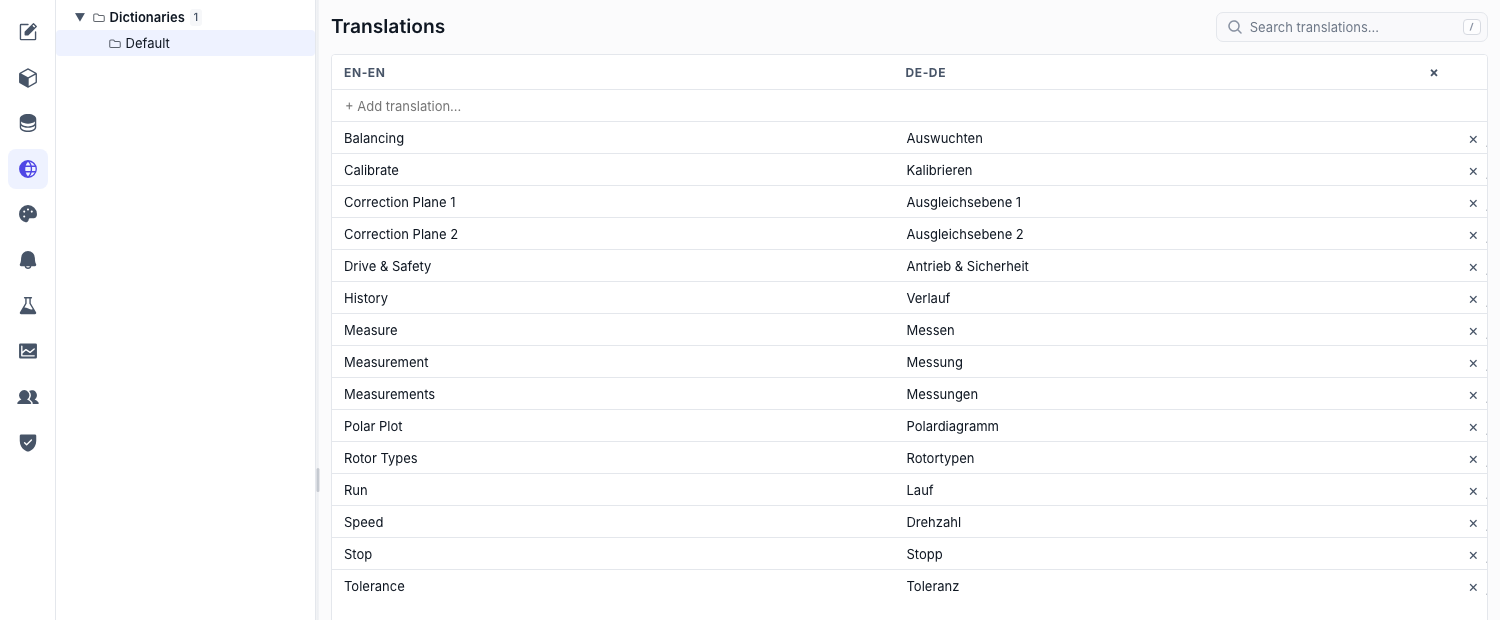
Set the languages up
- Open the Translations area — Pick Translations in the editor's left rail.
- Add a language column — Add each language by code (
en-EN,nl-NL,de-DE). The primary column cannot be renamed, moved or removed — every key in the project depends on it. Removing a secondary language drops just that column. - Add a phrase — Type the primary-language text; the row appears with empty cells for the other languages.
- Fill the cells — Edit each translated cell inline. The primary cell is read-only by design: changing it would change the key and break every binding pointing at it.
- Save — Translations save with the editor's normal Save.
Keys are immutable. To reword the English, add the new phrase, re-point the bindings, then delete the old row. That is deliberate — a silent key rename would leave every other language column attached to text that no longer means the same thing.
Split the catalog into dictionaries
The tree on the left lists dictionaries. Default always exists and cannot be deleted; add others (Motor, Alarms, Maintenance) to keep a large project navigable. Each is its own CSV with its own language columns, edited independently.
Use a translation on a screen
Set any String field's source to Localizable Text ($loc) and pick the phrase. It works anywhere a string does — a label, a button caption, a page title, an alarm message, a toast.
"label": { "$loc": "Motor speed" }
Need translated text with live values beside it? Combine the two: $stringExpr builds a string from a template with {1}, {2} placeholders, and each placeholder is its own binding — so a placeholder can be a $loc while the next one is a tag. The template itself is literal, so keep the translatable words in the wildcards and only structure in the template. See Dynamic properties.
Let operators switch language
Three ways, pick whichever suits the panel:
- Language Switcher widget — drop it in a shell region and it lists the configured languages with a label of your choosing. See the catalog.
- Set Language action — a Set Language action on any button, with the code either fixed (a flag button per language) or bound. See Actions.
$languagessource — the list of configured language codes as aString[], for building your own picker in a custom widget.
Whichever you use, the change is instant and project-wide within that runtime — no reload, no navigation.
Language changes also fire the onLocaleChanged global event, which is where "re-fetch the shift report in the new language" belongs. See Global events.
Working with translators
The CSV is the hand-off. Send translations/Default.csv, get it back with a filled column, drop it in place. Two rules keep that safe:
- Do not reorder or rename the header row — the first code is the primary and the rest are matched by name.
- Do not edit the first column. It is the key; changing it orphans every binding.
If two people save the same dictionary at once, the second save is refused with a conflict rather than silently overwriting: reload, then re-apply.